Order Confirmation with Delivery Date
Mark order confirmations as sent with or without delivery date.
Table of contents
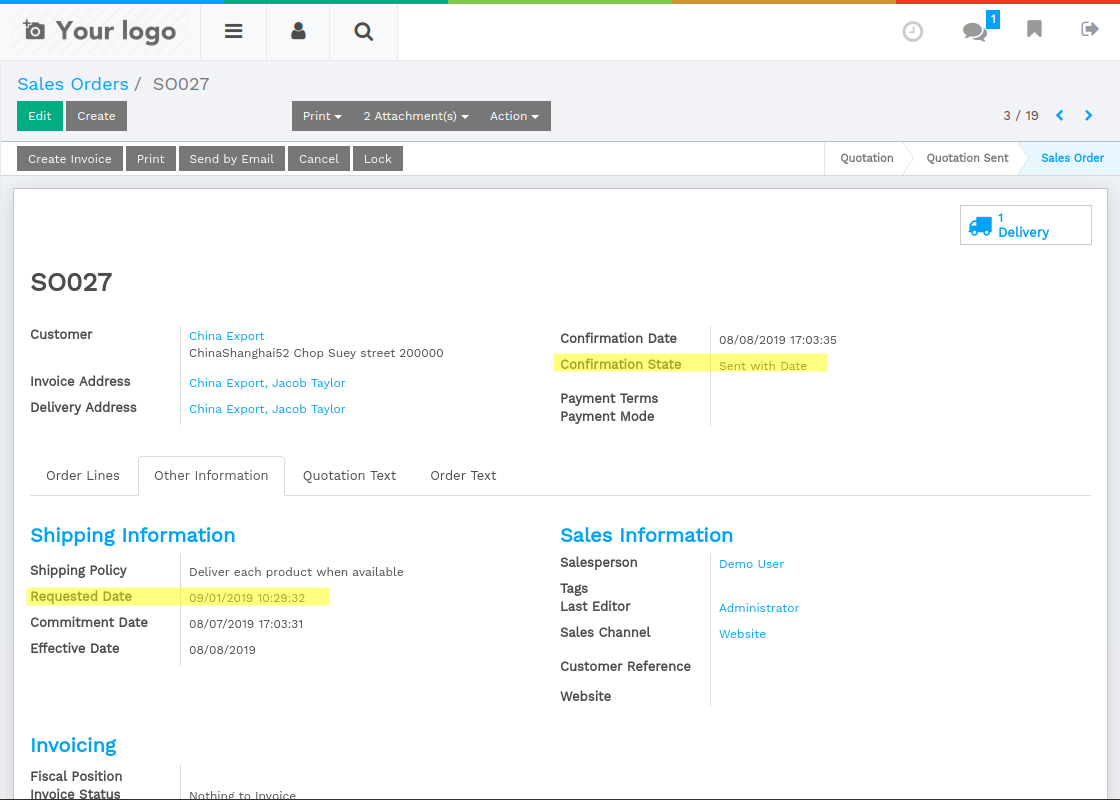
State of Order Confirmation
Show if sent with or without delivery date
- If a delivery date is set (field commitment_date) when sending the order confirmation by email, the state of order confirmation will be 'Sent with Date'. Otherwise, the state will be 'Sent without Date'.
Installation
To install this, follow below steps:
- Just simply mount this module as Flectra's custom module
- Now, Install the module in Flectra from Main Apps section.
Usage
How to use this module:
- You can set the date on which the customer expects delivery in field Commitment Date. The confirmation state will change, when an order confirmation is sent by email.
Dependent modules
- sale_stock
Change logs
- Added Order Confirmation with Delivery Date
Need more?
Other available modules
- Order Confirmation State on Stock Picking : Show the state of order confirmation on stock picking tree and form view.
- Phonecall Management on Sale Order : Schedule and register phonecalls on sale order.
- Product Characteristics : Allows to create characteristics for products.